PDF Reader Pro - Read All PDF
- 4.2
- Rating
- 1.00M
- Installs
- Free
- Price
 Analysis by App-foxy
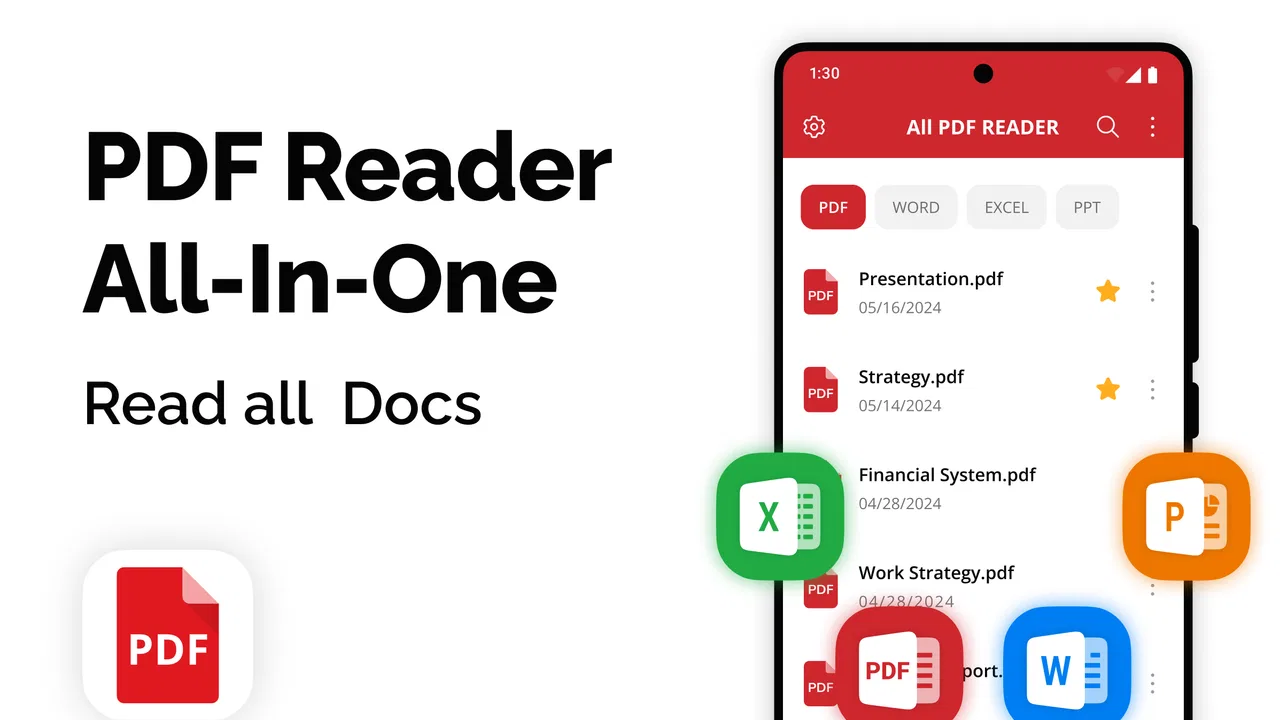
I usually judge a PDF app by a simple question: does it help me find, read, organize, and finish work with fewer interruptions than the viewer already on my phone? PDF Reader Pro - Read All PDF is aimed at that everyday productivity problem. It is a free PDF application from SkyDev Apps, and its focus is practical rather than specialized: opening documents, searching through them, keeping files manageable, reading comfortably, and sending pages to a printer when needed.
That makes it more interesting than a basic file opener, but not automatically the best choice for every reader. I see it as a middle-ground tool for people who handle PDFs regularly but do not need a full desktop publishing suite. It has reached over a million installs and holds a 4.2 average from around twelve thousand ratings, which suggests that its straightforward approach works for a broad audience. My recommendation depends less on those figures than on what you expect from a mobile document workflow.
How I would decide whether this PDF app belongs on your phone
Before switching to any document reader, I would separate three needs that are often mixed together. The first is simple access: opening a PDF from a message, download folder, or cloud location without hunting through menus. The second is document handling: finding a word, moving between pages, keeping important files easy to locate, and preparing a copy for printing. The third is advanced work, such as editing original text, marking up pages, filling complex forms, or collaborating with other people.
You May Also Like

 Blood Strike: 2.5 Anniversary
Blood Strike’s Loadouts Turn Every Drop Into a Tactical Gamble
A close look at Blood Strike’s custom loadouts: how fast access to signature weapons reshapes its battle royale rhythm, rewards preparation, and narrows the gap between fights.

 Pandora - Music & Podcasts
Pandora’s Music Is Easy to Start, but Harder to Recover
Pandora’s strength is its low-effort path from a seed to a station. Its weak spot is how much confidence it asks you to place in connection, setup, and quiet recovery.

 8 Ball Pool
 Is Built on Rivalries, Rematches, and Routine
A close look at the rivalries, rematches, shared routines, and unanswered safety questions that turn a quick pool match into a persistent mobile community.

 Samsung Music
’s Quiet Strength Is Playing What You Already Own
Its reach comes less from spectacle than from dependable access to a personal library. That simplicity is both the app’s strongest retention engine and its ceiling.

 AccuWeather: Weather Radar
AccuWeather Review: A Quick, Clear Forecast for Everyday Decisions
For everyday plans, the best forecast is the one you can understand quickly. AccuWeather makes rain timing, radar, and local conditions easy to act on, with a few trade-offs.

 Hill Climb Racing
Why Hill Climb Racing Still Turns Crashes Into One More Run
A tiny car, a bumpy hill and one more upgrade: Hill Climb Racing keeps resurfacing because its simple chaos makes every near-miss feel personal.
More From Our News Desk
View All News


PDF Reader Pro - Read All PDF is most naturally positioned around the first two needs. Its store summary highlights searching, management, reading, and printing, so I would approach it as a reader and organizer before treating it as an editing workstation. That distinction matters. A clean reading tool can be more useful than an overloaded editor when I only need to inspect invoices, manuals, application forms, tickets, or study material.
My first test for an app like this is how quickly I can get from receiving a document to actually reading it. On a phone, small delays become irritating when repeated several times a day. I want the document to open from the place where I found it, and I want the app to make the page itself the center of attention rather than forcing me through unnecessary setup. The second test is what happens after I have accumulated dozens of files. A viewer that opens one document well but leaves the rest scattered creates another problem.
Search is also more important than it sounds. In a long PDF, scrolling is a poor substitute for finding a phrase directly. I would use the search tool for locating a clause in a rental agreement, a part number in a manual, or a date in a downloaded schedule. The practical tip is to search for a distinctive word rather than a common one: a product code or unusual surname usually narrows the result faster than a broad term such as “service.”
Printing is another deciding factor. Many mobile PDF readers stop at viewing, while a productivity-oriented reader needs to support the point where a digital document becomes a paper copy. I would consider this especially useful for school forms, travel documents, signed paperwork, or instructions that are easier to keep beside a workbench. The app’s role is not just to display a file; it helps bridge the gap between the phone and a physical workflow.
What I would check during the first session
After installing it, I would immediately try three documents rather than judging it from one successful opening. First, I would open a short text-heavy PDF to check basic reading comfort. Then I would use a longer file and search for a term near the middle, because that exposes whether navigation feels practical. Finally, I would open a document I might actually print. This small routine tells me more than simply tapping through a sample page.
I would also build a modest folder habit from the beginning. If I download bills, work documents, recipes, and manuals into one undifferentiated space, any reader becomes harder to use. Grouping files by purpose makes the management side more valuable and reduces the temptation to keep duplicate copies. That is one of the less obvious advantages of choosing a dedicated PDF app: it encourages me to treat documents as a library rather than as disposable downloads.
There is a trade-off here. A dedicated app can make PDF handling more consistent, but it also adds another place where files may appear. If I already rely on a carefully organized file manager and only open a PDF once a month, installing a separate reader may not improve my routine. The benefit grows with repetition.
Where PDF Reader Pro - Read All PDF wins in daily use
The strongest case for this app is its clear concentration on ordinary PDF tasks. I do not need to learn a complicated workspace just to read a document. Search, reading, management, and printing form a sensible set for a phone-based productivity tool, and they cover the moments when a default viewer often feels too limited.
I can imagine using it during a normal workday in a very specific way. A supplier sends a multi-page instruction PDF while I am away from my desk. I open it on my phone, search for the relevant component, check the surrounding pages for context, and keep the document available for later reference. When I return to the office, I can prepare a printed copy instead of forwarding the file to another device. That is not a dramatic workflow, but removing those small handoffs is exactly where a mobile utility earns its place.
It is also useful for study and personal administration. I would use the search function to jump between terms in course notes, locate a section in a policy document, or find a specific line in an application form. For household paperwork, a reader that helps me manage PDFs can reduce the time spent reopening the same downloads from different message threads. The app is a good fit when the phone is already the first place where documents arrive.
Another strength is the balance between accessibility and purpose. The app is rated for Everyone, runs on Android versions from 6.0 onward, and is free to install. That combination makes it approachable for people using older compatible phones as well as newer devices. I would still judge the experience on the particular handset, especially for very large documents, but the broad compatibility lowers the barrier to trying it.
The current version is 1.3.6, so I would check that the installed build is current before making a final judgment about responsiveness or layout. Mobile document apps can change their handling of navigation and file organization between releases. In practice, I would spend a few minutes learning where the search and management controls live instead of assuming that every PDF viewer uses the same gestures.
Three habits that make the app more useful
My first useful habit would be to search before scrolling. When I need a particular instruction, I would enter a rare keyword, inspect each result in context, and then read a page or two on either side. This avoids the common mistake of treating the first match as the whole answer. It is especially helpful in manuals and policies where a definition may be separated from the instruction that qualifies it.
Second, I would use the app as a staging point for printing rather than printing immediately from an incoming message. I would open the PDF, verify that it is the correct version, search for the relevant section, and only then send it to paper. That workflow prevents a surprisingly common error: printing an attachment before checking whether it contains the pages I actually need.
Third, I would create a small “active documents” routine. Files needed this week should be easy to reach, while finished documents can be moved into longer-term groups. This is not a flashy feature claim; it is a way to get more from the management tools the app is designed around. The reader becomes more dependable when I maintain it like a working shelf instead of a dumping ground.
These habits also reveal the app’s likely sweet spot. It is valuable when reading and retrieval are repeated tasks. Someone who only wants to tap a PDF once may notice little difference from a built-in viewer, while someone who repeatedly searches, reviews, and prints documents can benefit much more.
What may slow me down
The app’s focused design can also feel limited if my definition of “working with a PDF” includes heavy editing. Reading and managing a file are different from changing its original text, building elaborate annotations, or handling a complicated signing process. I would not choose this as my only tool for a document-heavy professional workflow unless my needs stay within the reader, search, organization, and printing side.
There is also a cost consideration behind the word “free.” The app is free to download, but in-app purchases range from $1.99 to $49.99 per item. That does not make the basic installation unattractive, but I would pay attention to which capabilities are available without payment before moving important work into it. A good approach is to test the documents and actions I use most often first, then decide whether any paid option solves a real recurring problem rather than buying on impulse.
I would also avoid assuming that a PDF reader can replace a file manager, a scanner, a word processor, and a collaboration platform at once. Keeping those roles separate often produces a cleaner routine. PDF Reader Pro - Read All PDF makes sense as the document-reading center of that routine, not necessarily as the entire routine.
When another type of app may fit better
If I mainly read PDFs stored in a cloud service and already have a trusted cloud app with excellent search and organization, switching may add little. In that situation, the existing service may keep files synchronized with my computer more naturally. I would choose this app when I want a dedicated PDF-focused place on the phone, especially if printing and local document handling matter more than broader cloud collaboration.
If I need to edit paragraphs, redesign pages, or extract content for a larger office process, I would look toward a full PDF editor instead. Those tools are built for document production rather than simple consumption. They may be more expensive or more complicated, but the extra complexity is justified when a document must be changed rather than merely understood.
If I mostly annotate textbooks or mark up plans, I would compare this app with a note-taking or handwriting-oriented tool. A reader that is excellent for searching and printing may not be the most comfortable environment for extensive handwritten comments. The right choice depends on whether the PDF is the final thing I read or a canvas I continuously modify.
If I handle sensitive work documents, I would make privacy and storage behavior part of my own evaluation before importing them. I would begin with non-sensitive files, inspect the app’s available settings and permissions on my device, and follow any workplace rules. That is sensible for any document application, and it prevents convenience from becoming a security shortcut.
For occasional reading, the built-in viewer may remain the better option. It is already present, requires no new learning, and may open a file directly from the message or browser where I found it. The dedicated app earns its place when I want a repeatable PDF workflow rather than a one-off preview.
The real cost of switching
Switching is not just the time spent installing an app. I would need to decide which existing PDFs belong in its working library, establish a naming or folder routine, and learn its navigation. If my documents are scattered across downloads, email attachments, and cloud folders, the app cannot magically repair that history. The first useful session may therefore involve cleanup, not reading.
That effort is worthwhile when I repeatedly lose time searching for the same files. I would start with a small group: current bills, active work documents, study material, or manuals I refer to often. After a week of normal use, I could tell whether the dedicated workflow is genuinely faster. If it is not, I would return to the simpler viewer without having reorganized my entire archive.
The financial side is similarly easy to manage if approached carefully. Since the app is free to install but includes optional purchases, I would avoid paying until I know which part of my routine needs improvement. A casual reader may never need to spend anything. A frequent user should evaluate the value of a paid item against the number of times it removes a real obstacle, not against a vague promise of having more tools.
One practical question is whether an older phone can handle the experience comfortably. The minimum operating system is Android 6.0, which gives the app a wide compatibility range, but operating-system support alone does not guarantee that every large or image-heavy PDF will feel equally quick. I would test the biggest documents I actually use rather than relying on a short sample file.
Another question is whether printing from a phone is genuinely convenient in my environment. If the printer is already easy to reach from my usual device, the feature may be a useful backup rather than a reason to switch. If I often receive documents away from my computer, it becomes more valuable. This is a good example of why the same app can feel essential to one person and unnecessary to another.
My recommendation after weighing the alternatives
I recommend PDF Reader Pro - Read All PDF to Android users who want a dedicated, approachable tool for reading, searching, organizing, and printing PDFs. I would particularly suggest it to students, home administrators, mobile workers, and anyone who receives documents on a phone and needs to find information inside them quickly. Its free entry point and Everyone age rating make it easy to try without turning the decision into a major commitment.
I would not make it my first recommendation for someone who needs a complete PDF production suite. If your work depends on advanced editing, extensive handwriting, complex forms, or team collaboration, choose a tool designed around those tasks. A focused reader is better when it stays focused; expecting it to replace every document application is likely to create frustration.
My best advice is to test it with your own workflow rather than with an imaginary ideal. Open a long document, search for several terms, organize a few files, and try the printing path you would actually use. Notice whether the app reduces the number of steps between receiving a PDF and completing your task. That is the meaningful measure here.
Overall, I see this as a sensible productivity companion for people who have outgrown a basic viewer but do not want the weight of a professional editor. SkyDev Apps has kept the app centered on the parts of PDF use that matter most in everyday situations. If your priority is dependable access and practical document handling, this is worth trying; if your priority is deep editing, look elsewhere before you reorganize your files.
FAQs for PDF Reader Pro - Read All PDF
01What is PDF Reader Pro - Read All PDF used for?
PDF Reader Pro - Read All PDF is designed for opening, reading, and managing PDF documents on a mobile device. During testing, it was useful for viewing files received by email, browsing downloaded documents, and checking pages without needing a desktop computer. Depending on the version and platform, it may also include tools for searching text, adding annotations, filling forms, signing documents, and organizing files.
02Can PDF Reader Pro - Read All PDF edit, annotate, or sign documents?
The app is primarily a PDF reader, but many versions provide additional document tools beyond simple viewing. Users may be able to highlight text, add notes, draw on pages, complete forms, or apply a signature. However, advanced editing features can vary between Android and iOS releases and may require a premium plan or in-app purchase, so it is worth checking the feature list before downloading.
03Does PDF Reader Pro - Read All PDF work offline?
Yes, PDF Reader Pro - Read All PDF can generally be used offline for documents that are already stored on your phone or tablet. This makes it convenient for reading manuals, tickets, study materials, and work files while traveling or without a stable connection. Internet access may still be needed for downloading files from cloud services, synchronizing documents, viewing online content, or completing certain account-related functions.
04Is PDF Reader Pro - Read All PDF free to download and use?
The application may be available as a free download, but the exact pricing model depends on the store version and the developer’s current offering. Basic PDF viewing is commonly available without payment, while advanced tools, cloud features, document conversion, or removal of restrictions may be placed behind subscriptions or one-time purchases. Review the in-app purchase details carefully before starting a trial.
05Is PDF Reader Pro - Read All PDF safe for private and confidential documents?
PDF Reader Pro - Read All PDF can be useful for handling personal documents, but users should still review its permissions, privacy policy, and available security options before importing sensitive files. Avoid uploading confidential material to cloud services unless you understand how it is stored and synchronized. Keeping the app updated, using device security, and downloading it only from the official Google Play Store or Apple App Store are also recommended.
Pros
- Opens large PDF files smoothly on most modern devices.
- Supports bookmarks for quickly returning to important pages.
- Offers useful page thumbnails for faster document navigation.
- Can handle password-protected PDF files securely.
- Provides multiple reading layouts for different viewing preferences.
Cons
- Some advanced tools may require a paid subscription.
- The interface can feel crowded for first-time users.
- Large documents may consume considerable device storage.
- OCR accuracy can vary with blurry or complex scanned pages.
- Some features may work differently across Android and iOS.

PDF Reader Pro - Read All PDF
Gallery